
The Octane Image Texture node is used to import external texture maps to any material parameters that accept a texture map. Figure one shows a graph of an Octane material. a bitmap titled "screws2Prnt.jpg" has been connected to a material's Bump attribute.
Octane materials should use Octane material texture, not Maya’s native image texture.
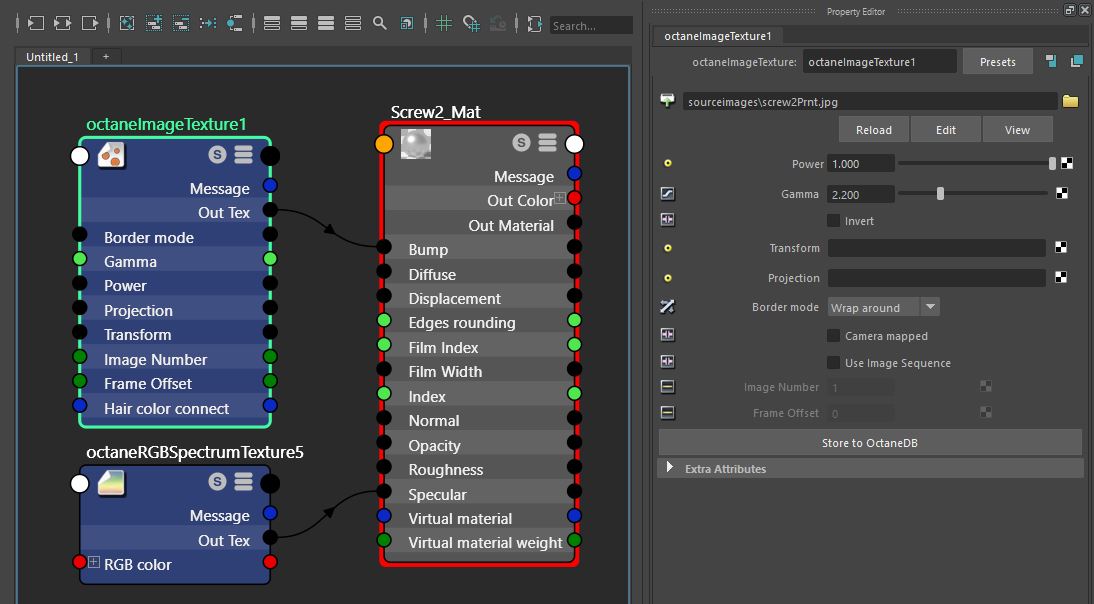
Figure 1 : An Octane Image texture is connected to the Bump channel of an Octane material .
Octane Image Texture Parameters
Power
Controls the brightness of the image, lowering the value will cause the image to appear darker on the surface.
Gamma
Controls the luminance of the input image and can be used to tune the image or color correct the image if needed.
Transform
Input accepts an Octane transform node which can be used to adjust the position of the image on the surface. These nodes are described in the Octane Transform node section of this guide
Projection
Input accepts an Octane projection node. If nothing is connected to this input the image texture will use the surface’s UV texture coordinates by default. Projection nodes are described in the Octane Projection node section of this manual.
Border Mode
Sets the behavior of the space around the image if the image does not cover the entire geometry. The default behavior is Wrap around which means that the image is repeated in the areas outside of the images coverage. If set to white or black the area outside the image will be white or black respectively.
Camera Mapped
Is a toggle which sets the current rendering camera to project the image onto the surface. This can be useful when projecting images onto a surface. To specify the projection camera type the name of the camera into the Mapped Camera field (figure 2).

Figure 2: Mapped Camera inputs is used to specify projection camera
Use Image Sequence
Enables the ability to use animated images on the surface. Image number. The Image number field specifies the image number in the sequence. If a frame offset is required to shift the sequence number a Float image texture can be connected in the Hypershade and an image offset value can be specified (see Figure 3).

Figure 3 : An Octane Float Texture is connected to an Octane Image texture to specify the frame offset when an image sequence is used.
Comments
0 comments
Please sign in to leave a comment.