
The Noise node is useful for creating and controlling the appearance of intentional noise. There are 4 noise types:
- Perlin – Similar to the turbulence node with “use turbulence” disabled.
- Turbulence – Similar to the turbulence node with “use turbulence” enabled.
- Circular – Produces a Worley noise.
- Chips – Produces a Voronoi noise.
Figure 1 compares the different noise types applied to spheres.

Figure 1 : Four spheres each with a different noise type connected to the diffuse channel of their materials
Noise Texture Parameters
Octaves
Adjust the scale of detail in the noise.
Omega
Adjusts the sharpness of the noise detail.
Transform
Accepts an Octane Transform node which can be used to change the position and scale of the noise
Projection
Accepts an Octane projection node which determines how the noise is mapped to the surface. If left blank the object's UV texture coordinates determine the mapping.
Invert
Reverses the colors of the noise.
Gamma
Adjusts the luminance values of the noise.
Contrast
Adjusts the overall contrast of the noise texture.
Figure 2 shows a Noise texture connected to the Diffuse channel of an Octane material.
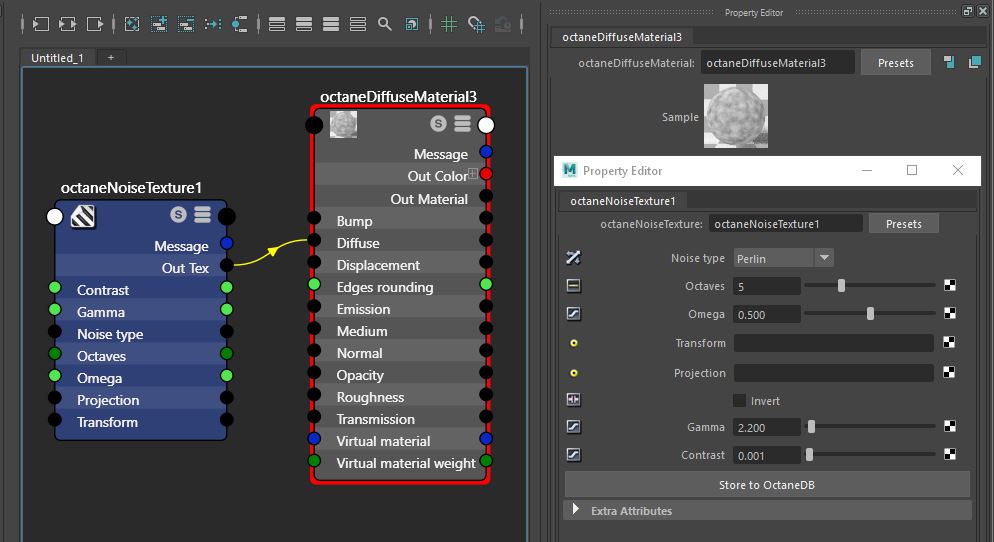
Figure : An Octane Noise texture connected to the Diffuse channel of an Octane material/
Comments
0 comments
Please sign in to leave a comment.