
Texture types allow for creating very flexible materials. This section of the Reference Guide details all the texture nodes available in the Maps rollout of the Slate Material Editor.
Texture types are classified into the following:
- Generators or Regular Textures – These are used to create procedural textures similar to specific patterns used in the real world.
- Mappings – These specify how the procedural textures or image textures will be mapped across a surface.
- Images – Texture maps with varying states including Alpha, Greyscale and RGB.
- Colors – Color textures with varying states including Alpha, Greyscale and RGB.
Material Texture Interface
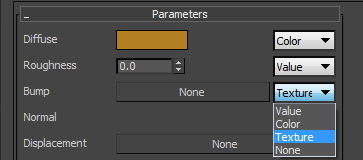
Material parameters with texture map capabilities will have a drop box with the following options.
Comments
0 comments
Please sign in to leave a comment.