
The Absorption Medium
Absorption is controlled with the absorption texture, which defines how fast light is absorbed while passing through a medium. A setting of 0.0 means no absorption. The higher the value the faster light is absorbed by the medium.
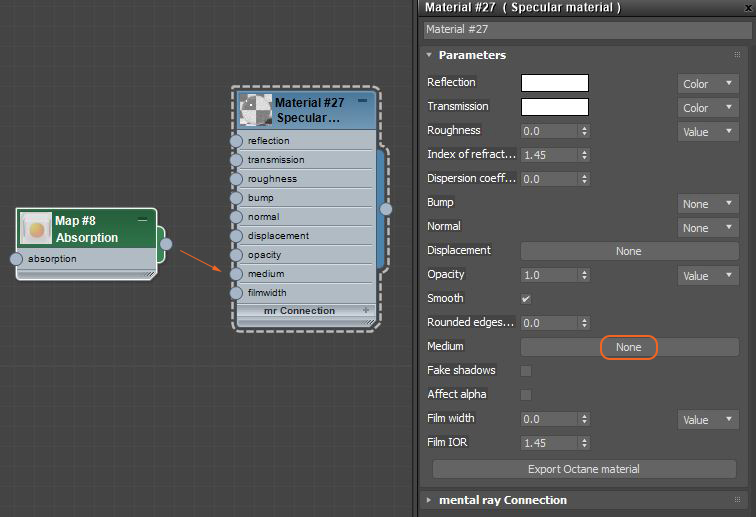
The Absorption map can be added to a material by clicking on the None button next to the Medium parameter or by adding an Absorption node and connecting it to the material's Medium pin.
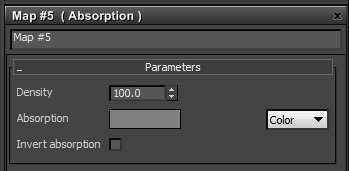
The absorption texture can be a color, value, or texture map and is multiplied by the Density parameter. This allows setting a wide range of values more easily.
The color resulting from the absorption is dependent on the distance light travels through the material. With increased distance it will get darker and if the absorption is colored it will become more saturated. It works in a subtractive manner in that the scattered color is the compliment of the color designated in the parameter.

Rendering an absorption medium requires the Path Tracing or the PMC kernel, with a sufficiently large maxdepth setting. For media inside Diffuse transmitting materials the Direct Light kernel with Diffuse (4) GI mode can be used as well.
Meshes
Participating media should only be added to meshes that define a closed volume, rather than planes. Using planes to model leaves of a plant with SSS will for instance not work. Using a single plane as a ground plane will work, however, it will be treated as an infinitely deep material. The mesh can have opaque objects nested inside, but nested participating media are not supported.
Comments
0 comments
Please sign in to leave a comment.