
There are five types of materials available in OctaneRender.
- Diffuse — Used for dull, non-reflecting materials or light emitting surfaces (mesh emitters).
- Glossy — Used for shiny materials such as plastics or metals
- Specular — Used for transparent materials such as glass and water
- Mix — Used to mix any two material types
- Portal — Used to designate openings in scenes to allow the render kernel to better sample light from those areas. The Portal material is covered in more detail in the Lighting section.
The most commonly used materials are the Diffuse, Glossy, and Specular. The Mix material is often used to blend any combination of these material together to provide deeper surface characteristics. It’s possible to switch between these three types by a Type parameter. So material type easily can be changed without loosing the parameters.
One common way OctaneRender materials can be accessed is from the Material Manager window (figure 1).

Figure 1: the C4D Material Manager window
OctaneRender for C4D also provides an Octane specific material editor window called the Octane Node Editor. It can be accessed from the Live Viewer window's Materials menu (figure 2).
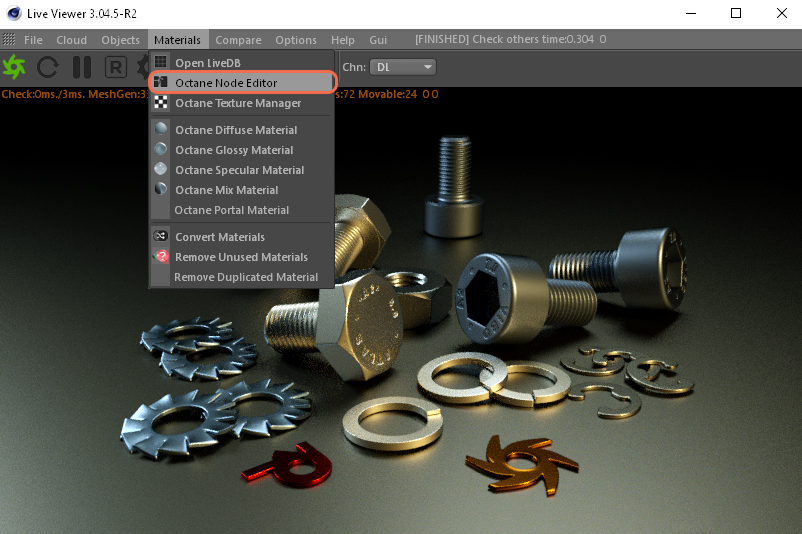
Figure 2: Access the Octane Materials using the c4D Live Viewer’ Materials menu.
It can also be accessed from the Octane Dialog window's Materials menu (figure 3).

Figure 3: Access the Octane Materials using the Materials menu.
OctaneRender Material Node Editor. This reference guide will utilize the material Node Editor for the remainder of the material and texture articles (figure 4).
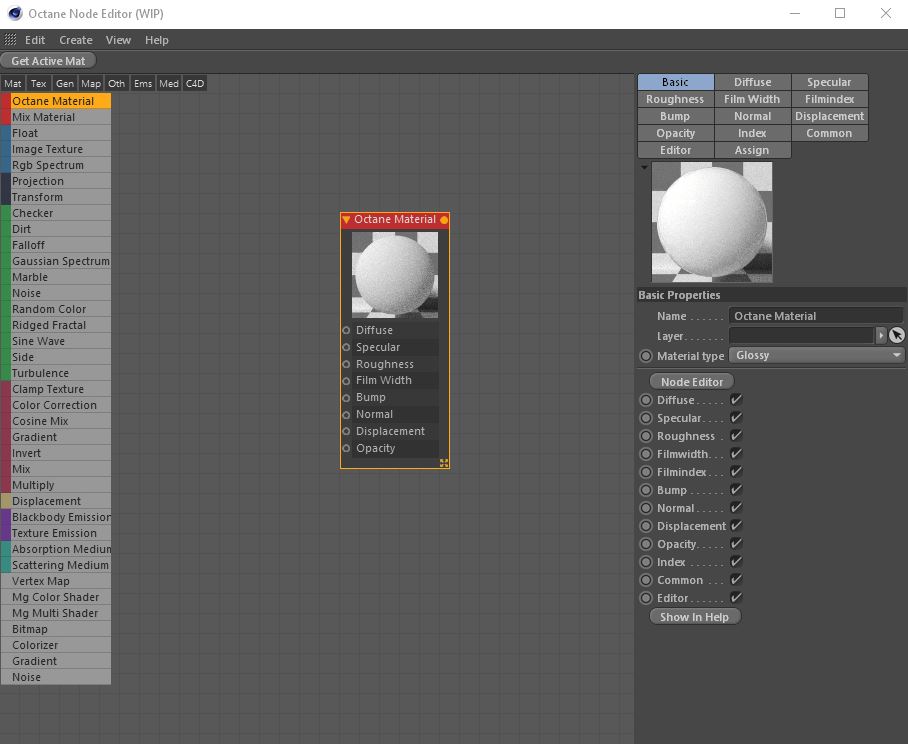
Figure 4: Access the Octane Materials using the Node Editor.
Comments
0 comments
Please sign in to leave a comment.