
The Diffuse material is used for dull, non-reflecting materials or mesh emitters.
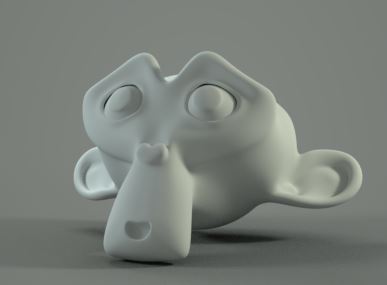
Diffuse Material Parameters
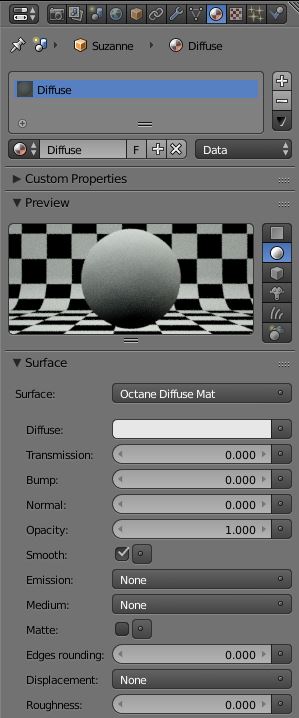
Diffuse
The Diffuse value gives the material its color, the Diffuse parameter will also accept a value or an image-base texture.
Transmission
The Transmission value contributes to the base color of the material especially in indirectly lit areas. It mixes with colors or texture maps placed into the Diffuse parameter.
Bump / Normal
Both the Bump and Normal parameters can load images to control the amount of bump mapping and normal mapping. Although both parameters have the option to accept values and colors as inputs, a texture map is the most appropriate input parameter.
Opacity
Opacity sets the transparency of the material. Although this parameter has the option to accept values and colors as inputs, a texture map is the most appropriate input parameter. The Alpha Image map can also be used to extract alpha information from a connected texture map.
Smooth
Refers to Normal Smoothing which is a Boolean value that sets whether to smooth the normals of all meshes sharing that material. When off, the materials can be faceted and polygonal.
Emission
The Emission parameter accepts either a Black Body Emission or a Texture Emission map type. This parameter will make the material emit light and is used to create mesh emitters. These mapping types are covered in more detail under the Texture Overview category and in Mesh Emitters under the Lighting Overview category.
Medium
OctaneRender for 3ds Max has two types of mediums: Absorption and Scattering.
- Absorption Medium
Absorption means that the material slightly absorbs light while passing through a surface. The color resulting from this absorption is dependent on the distance light travels through the material. The Absorption map type is covered in more detail under the Texture Overview category. - Scattering Medium
Similar to the absorption medium but with the option to simulate subsuburface scattering. This is a medium with single-scattering SSS in addition to absorption. The Scattering map type is covered in more detail under the Texture Overview category.
Matte
This parameter is a boolean value and is used to create a shadow catching material. When active, the material will only render shadows cast onto it and be transparent everywhere else across a surface.
Edges Rounding
This creates a shader effect at render time that rounds the sharp edges of objects without modifying and reloading the geometry. Higher values will round the edges more. This is very useful to virtually bevel hard edges during render time especially when using low-polygon models.
Displacement
The displacement mapping allows the height of points on a surface to be adjusted based on an image value. Displacement differs from Bump/Normal mapping by providing true displacement of an objects surface. Displacement mapping is covered in more detail under the Texture Overview category.
Roughness
The Roughness parameter will simulate very rough surfaces like sandpaper or clay. It accepts a value, color, or image-base texture.
Comments
0 comments
Please sign in to leave a comment.