
The Scattering map is a medium with single-scattering SSS as well as absorption. The Scattering node can be added to a material by clicking on the Add in the Material Node Editor and choosing Octane Medium.
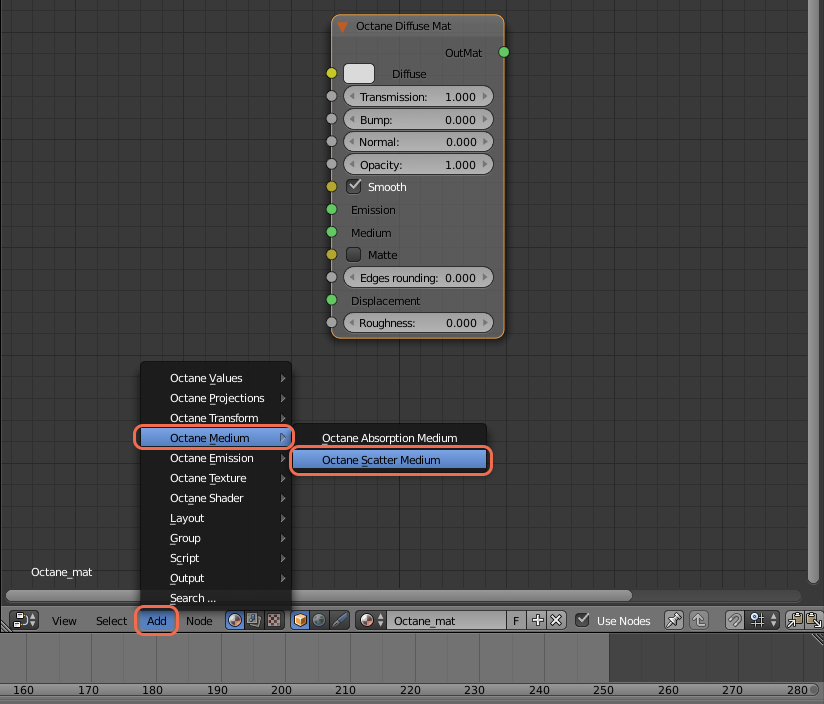
Octane Scattering Medium Parameters
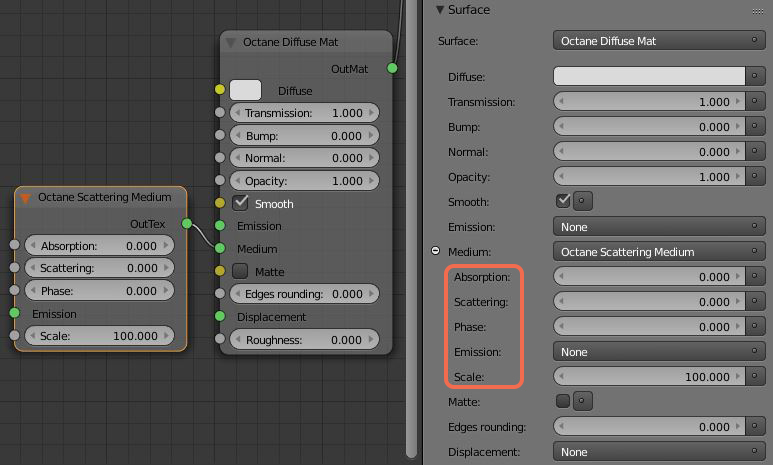
The Absorption parameter works as discussed in the Octane Absorption Medium article.
The Scattering parameter defines how fast light gets scattered when traveling through the medium, in a similar way to how absorption is defined. A very high value means light gets scattered very fast, a value of 0.0 means no scattering when the Scattering parameter is set to a value. The Scattering parameter will also accept a texture map or a color.
The Phase parameter controls in what direction light gets scattered. If set to 0.0, it means light gets scattered the same amount in any direction. A setting larger than 0.0 means forward scattering, the larger the value, the more light is scattered in a similar direction as it was traveling. 1.0 means it doesn’t change direction. A negative value means backscattering, so more light is scattered back to where it came from.
Finally, Emission is defined by attaching an Octane Emission node to the emission parameter. When connecting an emission map to a medium node, it defines emission inside the volume instead of on the surface of the object.
Meshes
Participating media should only be added to meshes that define a closed volume, rather than planes. Using planes to model leaves of a plant with SSS will for instance not work. Using a single plane as ground plane should be OK (it will be treated as an infinitely deep material). The mesh can have opaque objects nested inside, but nested participating media are not supported.
Comments
0 comments
Please sign in to leave a comment.