
OctaneRender supports participating media inside objects (absorption and SubSurface Scattering). These settings are stored in medium nodes, which are attached to the corresponding input pin of Diffuse or Specular material nodes.
Octane Scatter Medium has parameters for absorption, scattering of light passing through the medium, and emission inside the medium. Octane Absorption Medium is a simple version with only absorption.
Rendering a medium requires the Path Tracing or PMC kernel, with a sufficiently large maxdepth setting. For Diffuse materials, the Direct Light kernel with Diffuse (4) GI mode can be used as well.
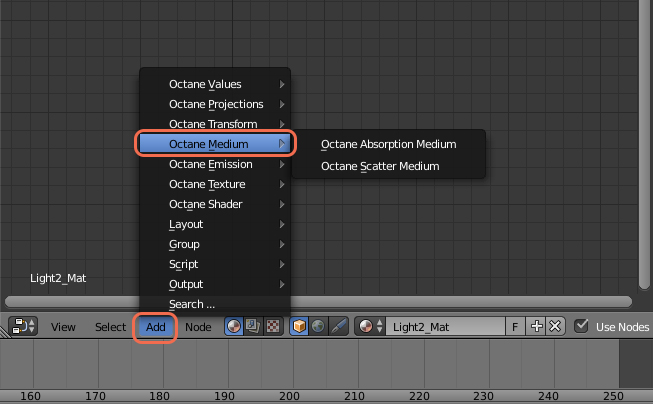
Meshes
Participating media should only be added to meshes that define a closed volume, rather than planes. Using planes to model leaves of a plant with SSS will for instance not work. Using a single plane as ground plane should be OK (it will be treated as an infinitely deep material).
How to make a medium node work:
A Specular material works best, by default it is set up properly. Transmission must be nonzero and a value of 1 produces the best results.

On Diffuse materials subsurface scattering only works after Transmission is activated using a value, color, or texture map.
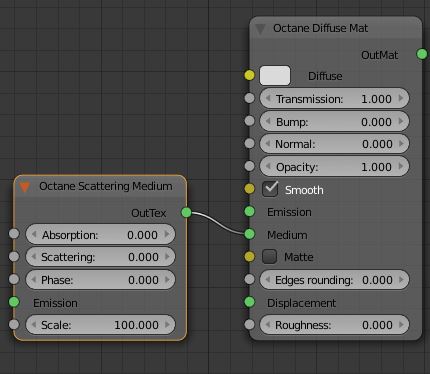
The reflection value for a Specular material needs to be set to a sufficiently low value because only the part of the spectrum that is not reflected can enter the object for scattering. If the reflection is set to 1.0, all light gets reflected regardless of the transmission value. If set to 0.0, all light gets transmitted, however, this gives an unnatural appearance. Values of 0.1–0.2 are a good starting point.
Also, if the reflection is colored, the transmitted light will have the complementary color (e.g. if the reflection is set to yellow, the transmitted light is bluish).

Comments
0 comments
Please sign in to leave a comment.